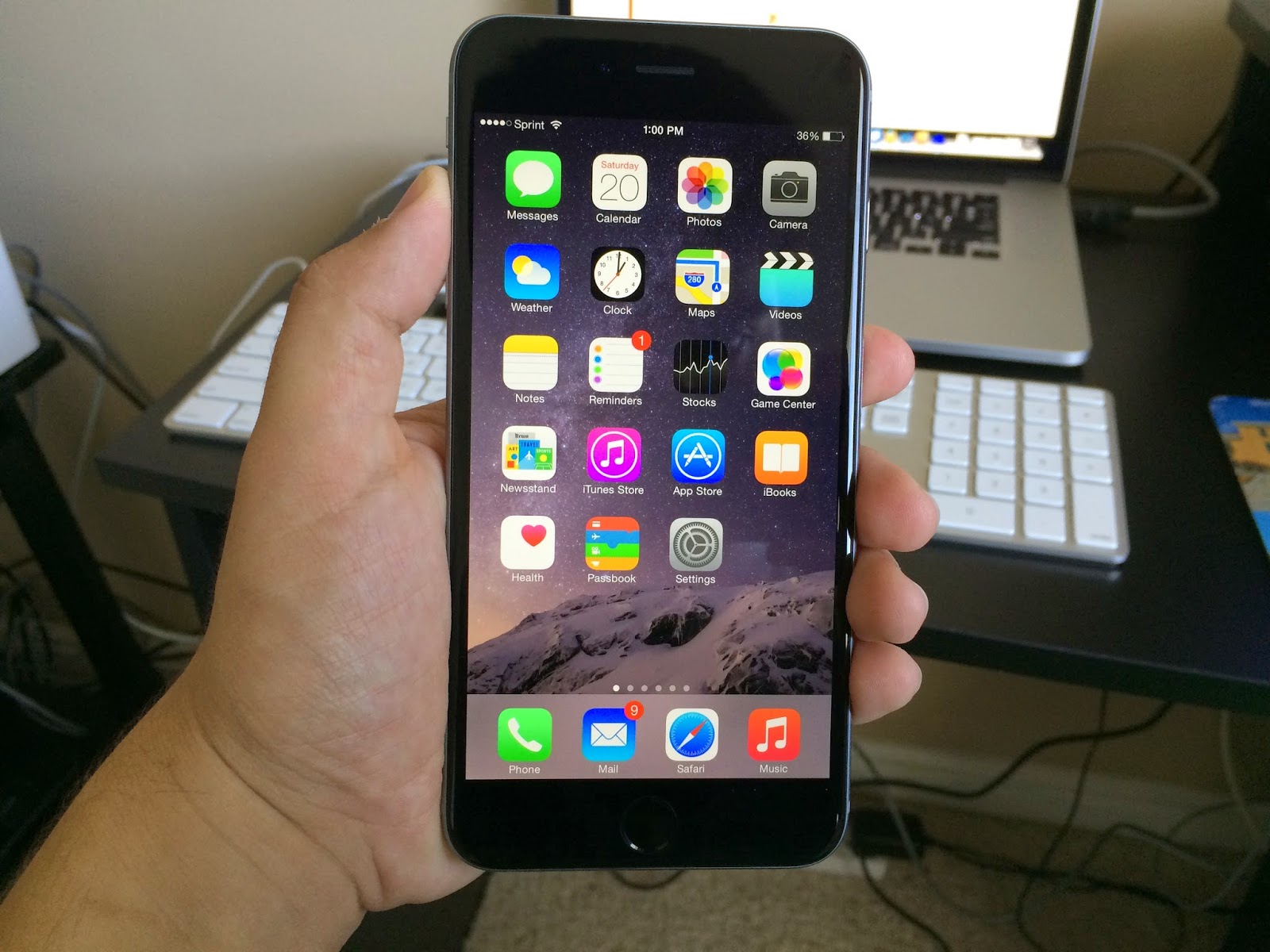
Today marks four weeks with my iPhone 6 Plus. To be honest, I meant to write this review two weeks ago, but I am somewhat glad I chose to wait. I wasn't really ready to write this review. The first six days with my iPhone 6 Plus weren't the best. It got to the point that I was flirting with the idea of traveling down to Utah and exchanging my iPhone 6 Plus for an iPhone 6. My wife has an iPhone 6, so I was able to compare my phone with hers. That all changed on the seventh day. Following those six days, I began loving my iPhone 6 Plus.
I never really cared for having a big phone, but I always want to have the better iPhone. Since the iPhone 6 Plus appeared to be the better iPhone, I chose the iPhone 6 Plus over the iPhone 6. I liked that it houses a 1080p display. I was really interested in the optical image stabilization as far as low-lighting photo taking and videos were concerned. Those are a couple of the features that are found in the iPhone 6 Plus that aren't available on the iPhone 6. More on that later.
Rather than talk about software, this review will focus mostly on the hardware of the iPhone 6 Plus. iOS 8.1 will be released on Monday, so rather than talk about iOS 8 (or iOS 8.0.2 for that matter), I will stick to talking about the things that make up the iPhone 6 Plus. I will give my thoughts about the overall performance of the iPhone 6 Plus, as well as what I think about the camera.
When I made the switch from an iPhone 4S to an iPhone 5, I liked the slightly taller size of the iPhone 5. It still felt great to hold an iPhone in one hand. Jumping from an iPhone 5S to an iPhone 6 Plus was a significantly bigger jump. Fortunately, the phone isn't just taller, it is wider. I still like how it feels in one hand, but I can't do nearly as much one handed on an iPhone 6 Plus like I could with its predecessors. I do like how the ends of the phone are rounded as opposed to straight. That does add to how well the phone feels in my hand.
The phone itself looks amazing. I still think that the iPhone 4/4S had the best design, but I have grown to like the design of the iPhone 6 Plus. It isn't the best looking iPhone nor is it the best looking smart phone, but it still has that quality build Apple is known for. That being said, I don't really have an opinion about the antenna lines. I wasn't a huge fan of the glass portions of the iPhone 5 and iPhone 5S, so having these antenna lines instead of the glass portions on the rear of the iPhone doesn't make a whole lot of difference to me. Like I said, I prefer the design of the iPhone 4 and iPhone 4S.
As I mentioned before, when compared to the iPhone 6, the iPhone 6 Plus is virtually the same phone. Whereas you get a unique experience with the Samsung Galaxy Note series compared to the Galaxy S series, the iPhone 6 and the iPhone 6 Plus are nearly identical as far as running iOS 8 is concerned. Instead, there are small differences between the two.
Apple chose to take advantage of the iPhone 6 Plus's size by allowing 6 Plus owners to be able to change the orientation of the home screen. Like an iPad, when you hold the iPhone 6 Plus horizontally the orientation of the screen changes to accommodate for the change in which you are holding the phone. It is neat being able to do that on an iPhone, but I have encountered various problems. Sometimes the phone doesn't change orientation at all. Sometimes the orientation changes without you moving your phone. I'm hoping that the iOS 8.1 update changes that.
The iPhone 6 Plus has the best screen an iPhone has ever had. I may have taken that from Apple, but I can confirm that the screen is simply amazing when you put it side-by-side to an older iPhone. It even looks better than the iPhone 6's screen. Apple has finally chosen to have an iPhone with a resolution we are familiar with. Like the iPhone 5 and 5S, the iPhone 6 has a weird resolution. Its resolution is 1334 by 750. The iPhone 6 Plus has a 1920 by 1080 resolution and it looks beautiful. I love watching movies on my iPhone 6 Plus that I have purchased through iTunes. The YouTube app was recently updated to take advantage of the bigger screens for the new iPhones, and it is nice that 1080p is finally an option on an iPhone. It may not be the best display in the market, but it is a nice screen regardless of what else is out there.
With an awesome display, who doesn't want a phone that is capable of taking great pictures? This was another factor for me when choosing between the iPhone 6 and iPhone 6 Plus. Both phones have an 8 megapixel camera, much like previous iPhones since the iPhone 4S. Rather than bump up the megapixels, Apple decided to continue fine-tuning what they already have. The iPhone 6 Plus has Optical Image Stabilization, and that helps the user when taking pictures. I have noticed that the pictures I take in places with low-lighting look great on my iPhone 6 Plus.
Videos also come out crisp and clean especially when my hands shake from time to time. OIS does make a difference in taking pictures and recording videos. Last year, Apple introduced Slow-Mo into the iPhone 5S. That feature has returned on the iPhone 6 and iPhone 6 Plus and it is even better. It still records the video in 720p, but at 240 frames-per-second. Slow-Mo videos are amazing to watch on the new iPhones. Even though there is room for improvement, I'm finally getting what I have been wanting from a phone with picture and recording capabilities.
The biggest problem I have with the iPhone 6 Plus isn't so much the phone, but the apps. I knew that there would be some issues running apps on a bigger phone, much like there was when the iPhone 5 came out. There have been quite a few apps that have been updated for the bigger display, but there are plenty that still look blown up or don't even cover the entire screen. The apps that don't cover the whole screen still work, except Star Wars Knights of the Old Republic wasn't really playable for a couple of weeks. They have since updated the game and now it can be played on an iPhone 6 Plus without any problems.
Even though I have had my fair share of problems with iOS 8, the new iOS runs well on the iPhone 6 Plus. Apps tend to load a little faster on the iPhone 6 Plus, and that should be expected with a new phone. The iPhone 6 Plus is a great update for those who still have an iPhone 4, an iPhone 4S, and even an iPhone 5. Unless you're wanting a bigger screen, I think you're better off waiting for the next iPhone if you're an owner of an iPhone 5S. Overall, I have been loving my iPhone 6 Plus and I recommend it to those looking for an upgrade. It really does feel like an upgrade compared to the iPhone 6, but it definitely isn't for everyone.
SCORE:
8.9/10
Showing posts with label Apple. Show all posts
Friday, October 17, 2014
Monday, March 31, 2014
REVIEW: Mophie Juice Pack Helium for iPhone 5/5S
Towards the end of November, I bought my fiancée and I each a Mophie juice pack helium case. I liked the idea of being able to charge my phone without having it connected to the wall for two to three hours. Another incentive was the fact that it was on sale. Usually priced at $79.95, I managed to acquire our cases for $55.95 each. Yet another reason to be thankful for Thanksgiving week.
My case is blue and her case is pink. I thought about getting the green case since I have this thing about getting green cases for my Apple products. In the end, I choose the blue one. Regardless of the color, the case does what is supposed to do: charge your phone.
The Juice Pack Helium comes in metallic black, metallic silver, purple, green, pink, red, or blue. It is the thinnest of the Juice Pack cases and comes packed with a 1500mAh battery. I'm pretty impressed by how thin this case is considering that it comes with a battery inside of it. Not only is it thin, it is also pretty light. The case alone weighs 2.44 oz. The Juice Pack Helium will provide up to 80% more battery life. This case will work for both the iPhone 5 and the iPhone 5S. I have the iPhone 5.
Included with the Juice Pack Helium are a micro USB cord and a headphone adapter. Because the headphone jack is so far into the case, you will need the headphone adapter to plug your headphones in to listen to music or whatever you are watching. I am grateful they included it. It is possible to insert your headphones into the headphone jack, but there is always the possibility that you aren't completely plugging your headphones in.
Having 80% extra battery life has been great, but I wish I had gotten the Juice Pack Air or the Juice Pack Plus instead. They would have cost more money, but having to charge my iPhone around 20% is kind of a pain. I usually wait until I am at 5% to 10% battery life.
My experience with the Mophie Juice Pack Helium hasn't been great either. Lately, my phone has been dying around 15% to 25%. That makes absolutely no sense to me. I have also made sure that it wasn't my phone by charging it the old fashion way. Doing so has had my phone last down to the wire.
I can't say I recommend buying the Mophie Juice Pack Helium. As light and as thin as it is, 80% more battery life doesn't cut it. If you are wanting a case that can charge your iPhone 5 or iPhone 5S, then I recommend looking at the Juice Pack Air or the Juice Pack Plus. They are a bit more expensive and there aren't as many color options, but they both cover your phone completely. The Helium doesn't cover the part of the phone where the volume buttons are. It isn't that big of a dael, but why not have your case cover your entire phone? Also, the Air only weighs 2.68 oz, so it isn't like it will weigh much more than the Helium case.
OVERALL SCORE:
6.2/10
Friday, April 19, 2013
REVIEW: Blotter for Mac OS X 10.6 or Later
![]() |
| I don't have much going on this week in school. That's what happens when you only have one final. |
Since I have been in college, I have been doing my best to be organized. I want to be able to know what it is I am doing throughout the day. I always carry my iPhone 5 on me, so it is easy to take a peek at the Calendar app that comes standard with the phone. I like the Calendar app that comes with all Mac computers, but I have been wanting something more. After watching a video about some neat apps for Mac computers, I thought I would check out Blotter.
Blotter works alongside the Calendar app, so whenever you record something on the Calendar app it will appear on the Blotter app. What I really like about the Blotter app is that you can have it set up to load as soon as your computer is on. I like that it is also transparent, so you will be able to see your background with ease. It also blends with your background, so you'll never find yourself accidentally clicking on it when you meant to click on a different window.
This app also is open to customization. To customize your Blotter calendar, simply click on the Blotter icon on the toolbar and then choose preferences. You can choose the window to be "Narrow," "Normal," or "Full." You can also select "Customize" to manual determine the size of the Blotter window. I chose to go with "Normal" screen window. It doesn't quite cover the entire screen, which I am happy with. It'll cover about two-thirds of the screen. "Narrow" will only have the left column of what "Normal" and "Full" screens show. It'll inform you of the date, what you have in your "To Do" list, and what is happening now and in two hours.
You can also change the layout of the calendar, but I don't find it very useful at all. It only changes the left column. Normal layout is what I have pictured, displaying the "To Do" and "Right Now" list, "To Do" layout only displays the "To Do" list, and "Right Now" layout only shows the "Right Now" list. It is pretty redundant to have the "Right Now" list only, but if you don't have much in your "To Do" list, then I would just leave the layout at "Normal." That's what I have chosen to do.
Just like the actual Calendar app, you can also decide what events will be displayed on the Blotter app. It'll also apply the colors you've chosen in the Calendar app. These colors will appear on the Blotter calendar without any problems. As you will be able to see in the picture, the calendar begins on Sunday and ends on Saturday. By clicking on the Blotter icon in the toolbar you will be able to cycle through previous weeks and upcoming weeks. It doesn't stagger at all. I love how fluid this app is.
If you're starting school, I recommend purchasing this app on the Mac App Store. It is $9.99, but completely worth the purchase. I enjoy using this app on my MacBook Pro.
OVERALL SCORE: 8.75/10
Labels:
app,
App Store,
Apple,
Blotter,
calendar,
iMac,
Mac App Store,
Mac mini,
Mac OS X,
MacBook Pro
Subscribe to:
Posts (Atom)
